Start with the questions customers ask
A small business website doesn't need dozens of sections. It needs to answer a handful of questions quickly, ideally on a phone: What do you do? Can you help me? What does it cost? When are you open? Where are you? How do I reach you? Everything on this checklist answers one of those.
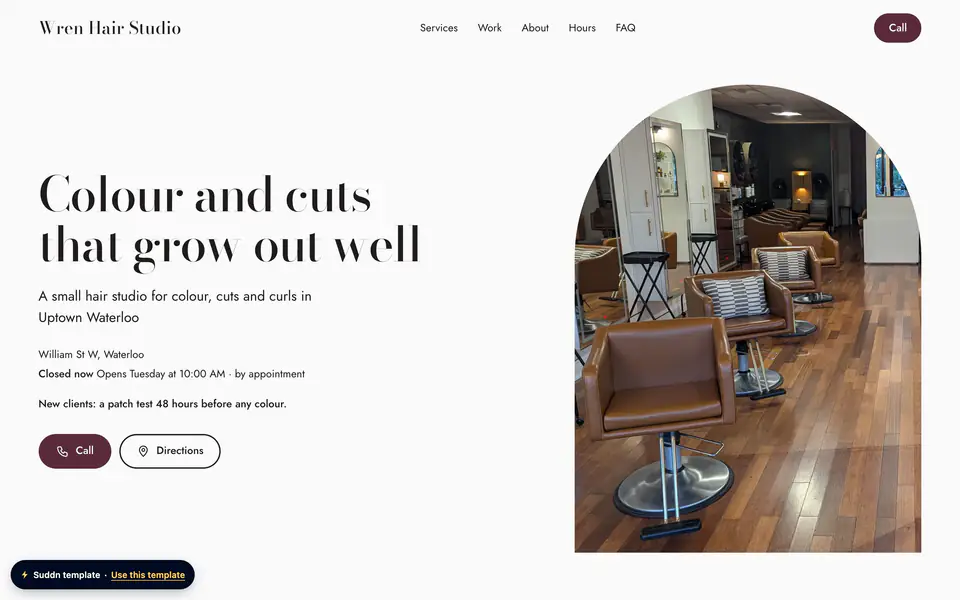
The examples below are for illustration.
Who you are and what you do
The top of your website should say your business name and, in plain words, what you do and where. "Plumbing repairs, drains and water heaters in Elm Falls and nearby towns" tells a visitor more than a slogan does. Within a few seconds, they should know they're in the right place.
- Your business name, exactly as it appears on your sign and your Google Business Profile
- One line on what you do, in the words your customers use
- Your town, or the area you serve
- Your logo, if you have one (a clear name is fine if you don't)
How to reach you
Make contacting you the easiest thing on the website.
- A phone number people can tap to call
- An email address or a contact form
- A quote request form, if you price jobs one by one (trades, cleaners, auto shops)
- A text message button, but only if your number can receive texts
- Links to the social accounts you actually keep up
- Booking links, if customers book appointments online
Whatever you list, answer it. A contact form that nobody checks is worse than no form at all.
Where and when
- Your street address, with a link that opens directions
- A short note if you're hard to find: "Two doors from the corner" or "Parking at the back"
- Your service area if you go to customers, such as "Elm Falls and 30 km around"
- Opening hours for every day, including the days you're closed
- Holiday hours, posted before the holiday
- An availability line if your hours aren't fixed: "By appointment" or "Emergency call-outs 24/7"
If you work from home and go to your customers, you don't need to publish your home address. Google's own guidelines ask service-area businesses to hide their address on their Business Profile, and the same thinking works on a website: show the area you serve instead.
What you offer and what it costs
List your services, products or menu items with prices wherever you can. Prices answer the question people are often too shy to ask, and they filter out calls that were never going to turn into work. If prices vary, a "from" price or a range is still useful. For appointments, add how long each one takes.
An example price list
For an example salon, a few lines might look like this:
- Women's cut and style: $65, 60 minutes
- Men's cut: $35, 30 minutes
- Full colour: from $120, 2 hours
- Balayage: $180 to $260, 3 hours
Group them the way customers think (Cuts, Colour, Treatments), and keep the list short enough to read on a phone. If you also have a printed menu or price list, a PDF is a handy extra, not a replacement.
Reasons to trust you
- Photos of your real work, your premises and, if they're willing, your team. No stock photos.
- A short about section with a real name: who runs the business and why.
- Years in business, if you've been around a while.
- Your credentials, memberships or certifications, listed plainly.
- A line for your licence or registration number, if your trade has one.
What you're required to show, if anything, depends on your trade and where you work, so check with your regulator rather than guessing. And never invent testimonials for your website. If you have Google reviews, point people to them instead.
Answers to common questions
A short FAQ saves you from answering the same questions all day, and it answers them at 11 p.m. when you're not picking up. Write the questions the way customers ask them, and start each answer with the answer.
- Do you charge for estimates?
- Do I need an appointment, or can I walk in?
- Is there parking?
- Which payment methods do you take?
- How far do you travel?
Behind the scenes
These are the parts customers don't see but notice when they're missing.
- It works on a phone. Google uses the mobile version of a site's content for indexing and ranking.
- It loads quickly, even on a weak connection.
- It has a secure address (https, the padlock in the browser).
- It has a clear title and a short description. Google advises descriptive, concise titles and descriptions that accurately summarize the content.
- Images have short alt text describing them, for people using screen readers and for search engines.
- A short privacy note if your forms collect names, emails or phone numbers.
What you can leave out
Plenty of things make a small business website slower or harder to use without helping customers. You can safely skip:
- Sliders and auto-playing video at the top
- Pop-ups that cover the phone number
- A blog you won't have time to keep up
- Long mission statements
- Stock photos of people who don't work for you
- Testimonials you can't put a real name to
A two-minute test before you share it
- Open the website on your phone, not your computer.
- Tap the phone number. Does it call?
- Tap the address. Do directions open?
- Ask a friend to find your hours and one price. Time them.
- Check that your name, address, phone and hours match your Google Business Profile.
- Read every price out loud. Is each one still right?
If you want a head start
Suddn has the sections above ready for your kind of business: menu or services, about, photos, hours and location, FAQ and contact, plus a quote request form for trades and auto shops. Write it for me can draft a headline, a short description and the about text from only your name, kind of business and city, without inventing prices, licences or other facts. You check and edit every line before it goes live. The Free plan is $0, and you add the rest from your phone whenever you have a minute.
In short
- Say who you are, what you do and where in the first line people see.
- Make calling, directions and getting a quote one tap away.
- List services or menu items with prices, a "from" price or a range.
- Use your own photos and a real name; never invent testimonials.
- Test it on your phone and match every detail to your Google Business Profile.